Verified. Clean.Built for hardworking people

Every client, every crew, one app.

Turnovers for three property managers, a dental office on Tuesday nights, a builder's final clean on Friday. LimeFlo puts all of it on one schedule, sends your crew out knowing exactly what to do, and backs every job with photos of every room.

$79 a month for your whole company First 30 days free Works in any phone browser today
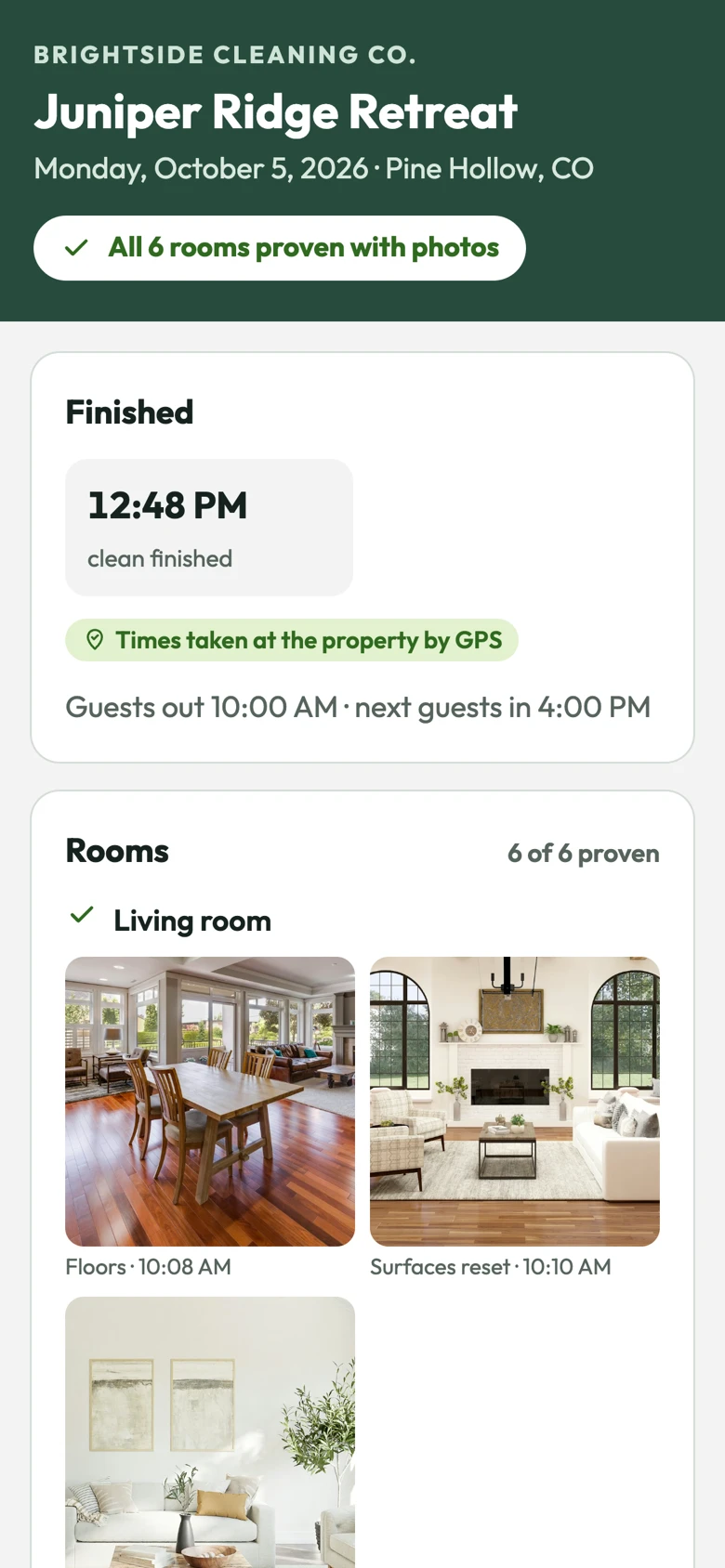
The completion report a client receives: Juniper Ridge Retreat, all six rooms proven with photos, finish time confirmed at the property by GPS, and the first room's photos.
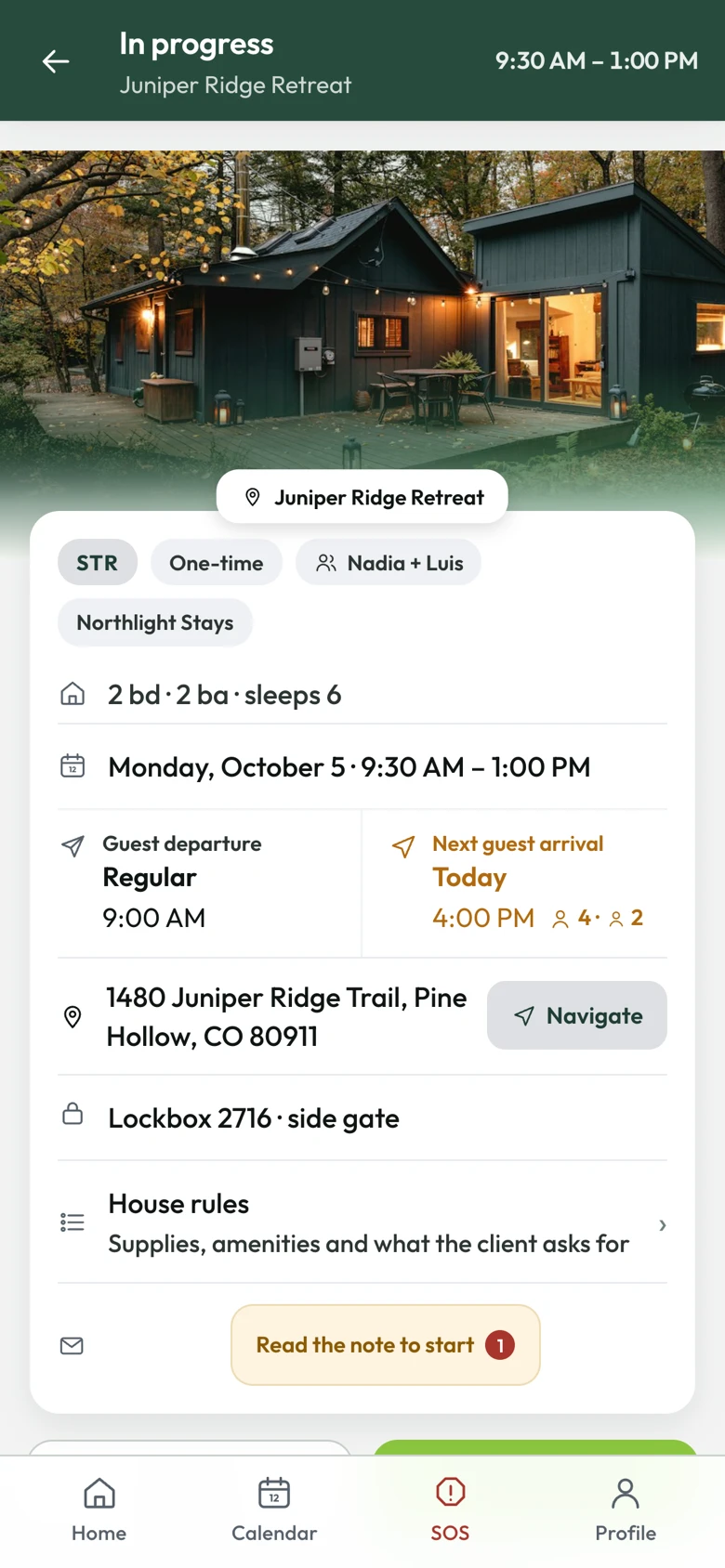
A cleaner's job card: a photo of the cabin, the beds and baths, today's times, when the guests leave and the next ones arrive, the address with a Navigate button, the lockbox code and a note that has to be read before the job can start.
Vacation rentals Property managers Private homes Offices & medical Post-construction English · Español · Português
How a day runs

From booking email to finished report

Most cleaning software stops at the calendar. LimeFlo follows the job all the way through: the booking that started it, the crew that did it, and the proof your client asked for.

1

A booking comes in

Paste the property manager's reservation email. LimeFlo finds the property and suggests the clean for check-out day. You say yes, keep it for later, or turn it down.

2

You put someone on it

Drag the job onto a cleaner in the office, or invite a contractor at a set price. Everyone sees their day on their phone.

3

The crew cleans and proves it

They clock in at the door, walk the place first, then photograph each room as they finish it. No signal? It all uploads later.

4

Your client sees the proof

When the last cleaner clocks out, LimeFlo builds a photo report from what the crew recorded. Your client opens it on a private link.

Bookings

Stop logging into five portals before breakfast

If you clean for several property managers, you know the morning routine: check every portal for new bookings and cancellations, copy them over, text the crew, and hope you didn't miss one. LimeFlo gives every booking one place to land, and nothing lands on the schedule until somebody in your office says yes.

  • Matched to the right property by address, listing name or a booking reference you've saved. A guess is marked as a guess.
  • Scheduled for check-out day, with when the guests leave and when the next ones arrive.
  • No duplicates. If the same booking email comes in twice, LimeFlo finds the job it already made.
  • Cancellations come back to you with the clean they affect, so a person decides whether it goes.
TodayHospitable booking emails, pasted into the office or the app
ComingYour own LimeFlo address to forward booking emails to, so they arrive by themselves
ComingTurno, Breezeway, Guesty and other systems' emails
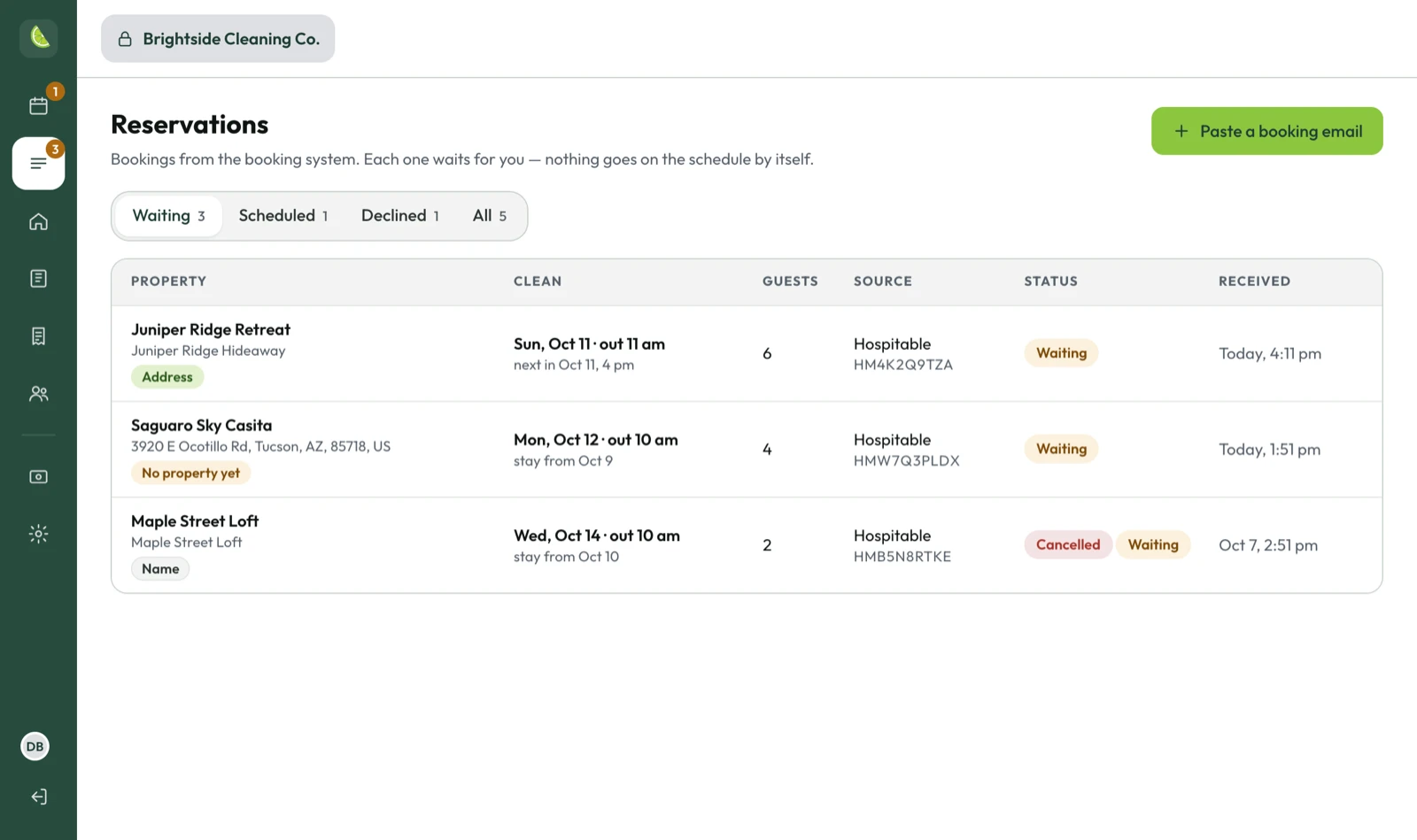
The Reservations page in the office: three bookings waiting, each with the property it matched, the clean date, the number of guests, the booking system and when the email arrived. One is a cancellation.
The office

A proper back office, on a proper screen

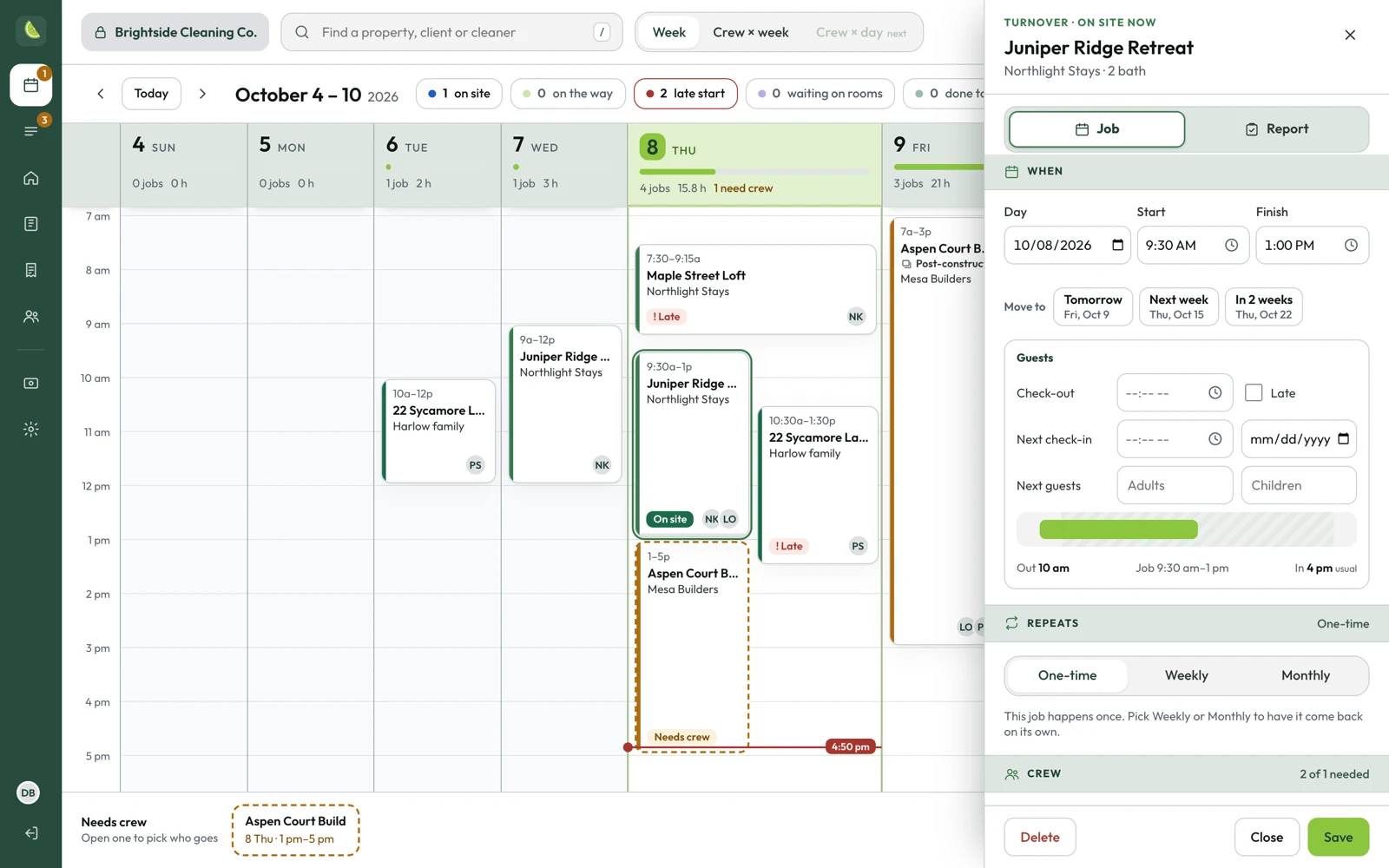
Your crew lives on their phones. Your office shouldn't have to. Open LimeFlo on a laptop and you get the whole week at a glance: who's on site, who's running late, and which jobs still need someone.

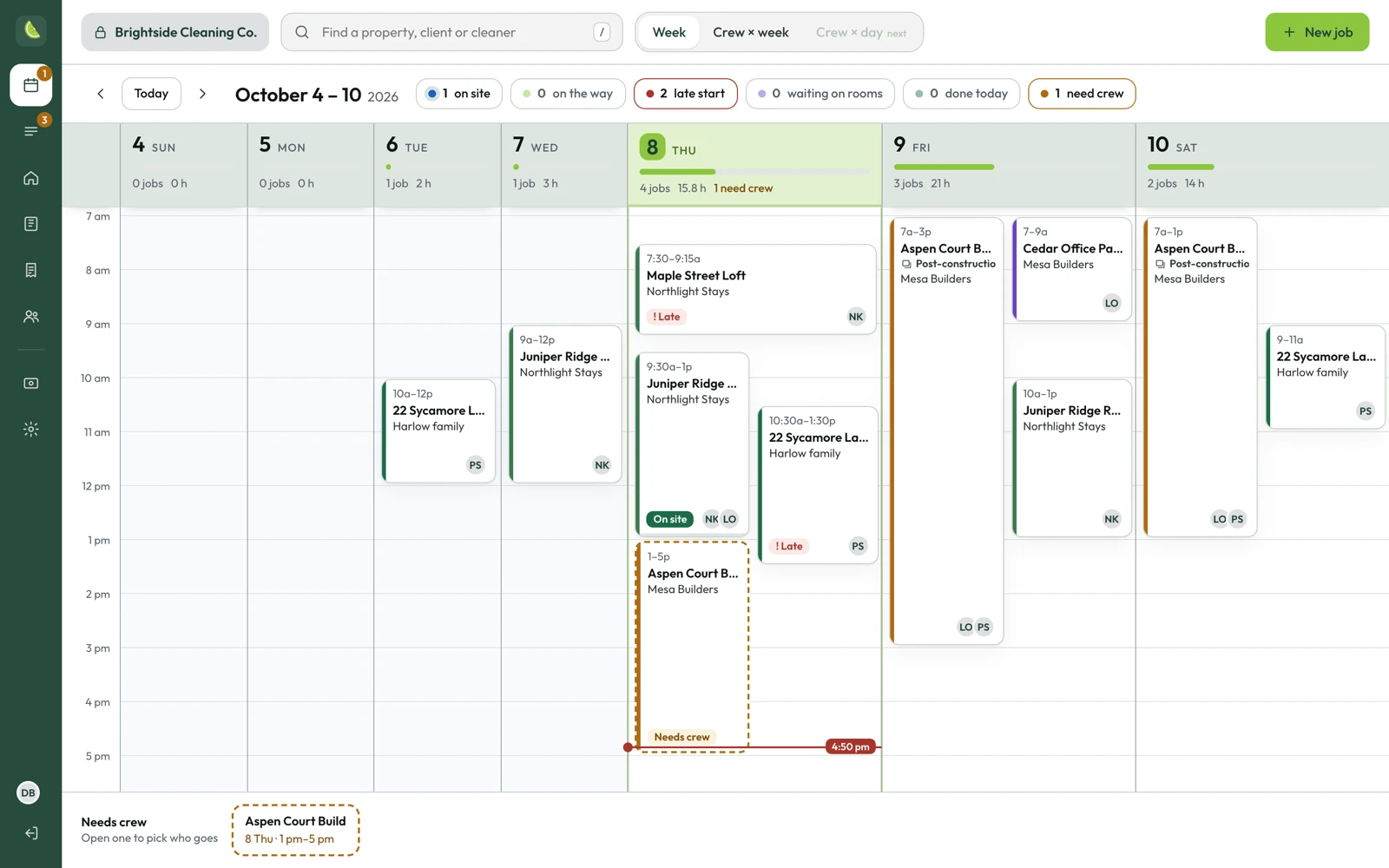
The office schedule for one week: jobs laid out by day and time, today's column highlighted, counters along the top for on site, late start and need crew, and two jobs outlined in orange because nobody is on them yet.
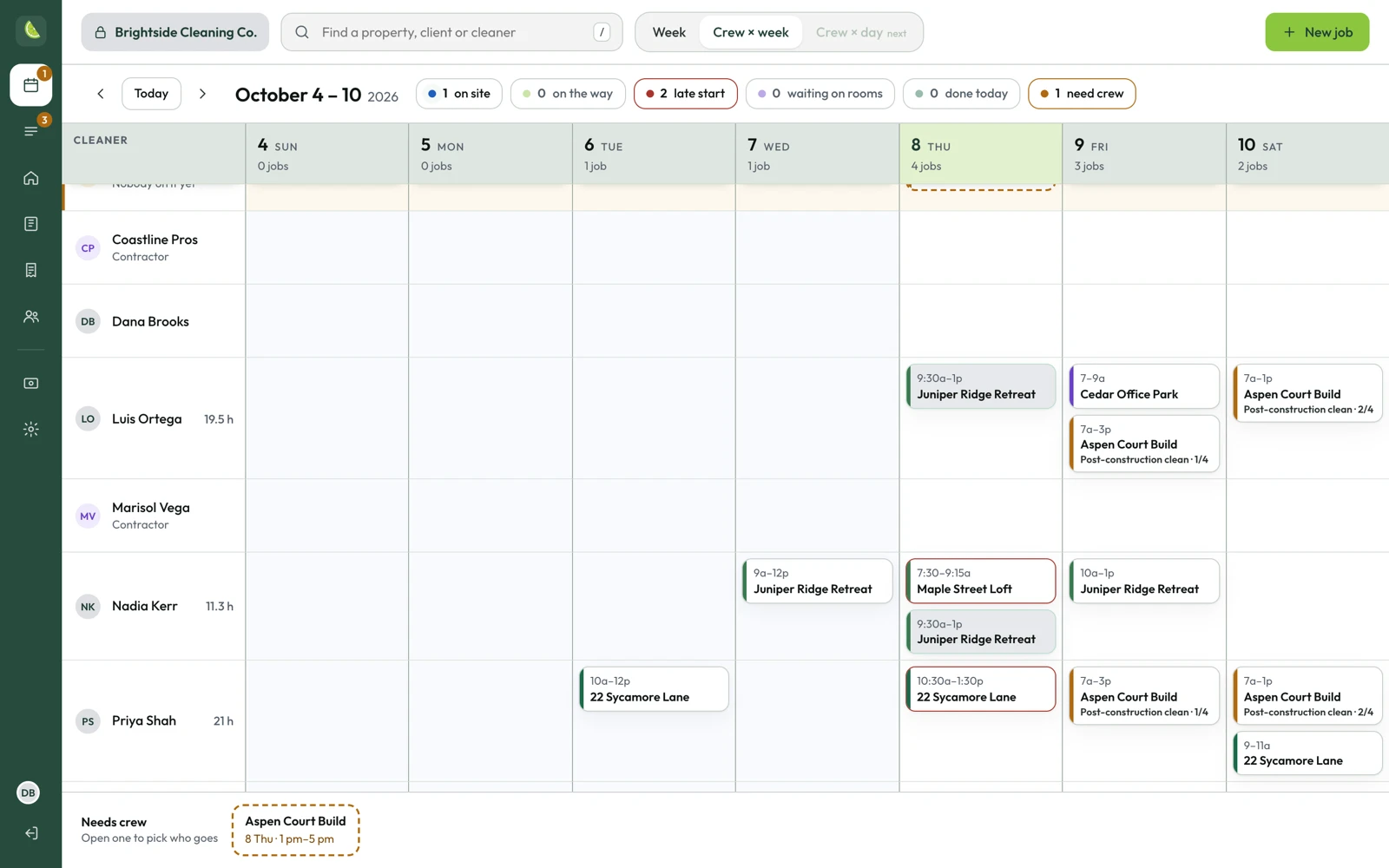
The crew view: each cleaner and contractor on a row, their jobs across the week, and a Needs crew row at the top.
Crew by week. Everyone on a row. Drag an open job onto whoever has the time.
A job open beside the schedule: day, start and finish, check-out and next check-in, how often it repeats and who is on the crew.
Every job, one click away. Times, turnover, repeats, crew and the client report, without leaving the week.
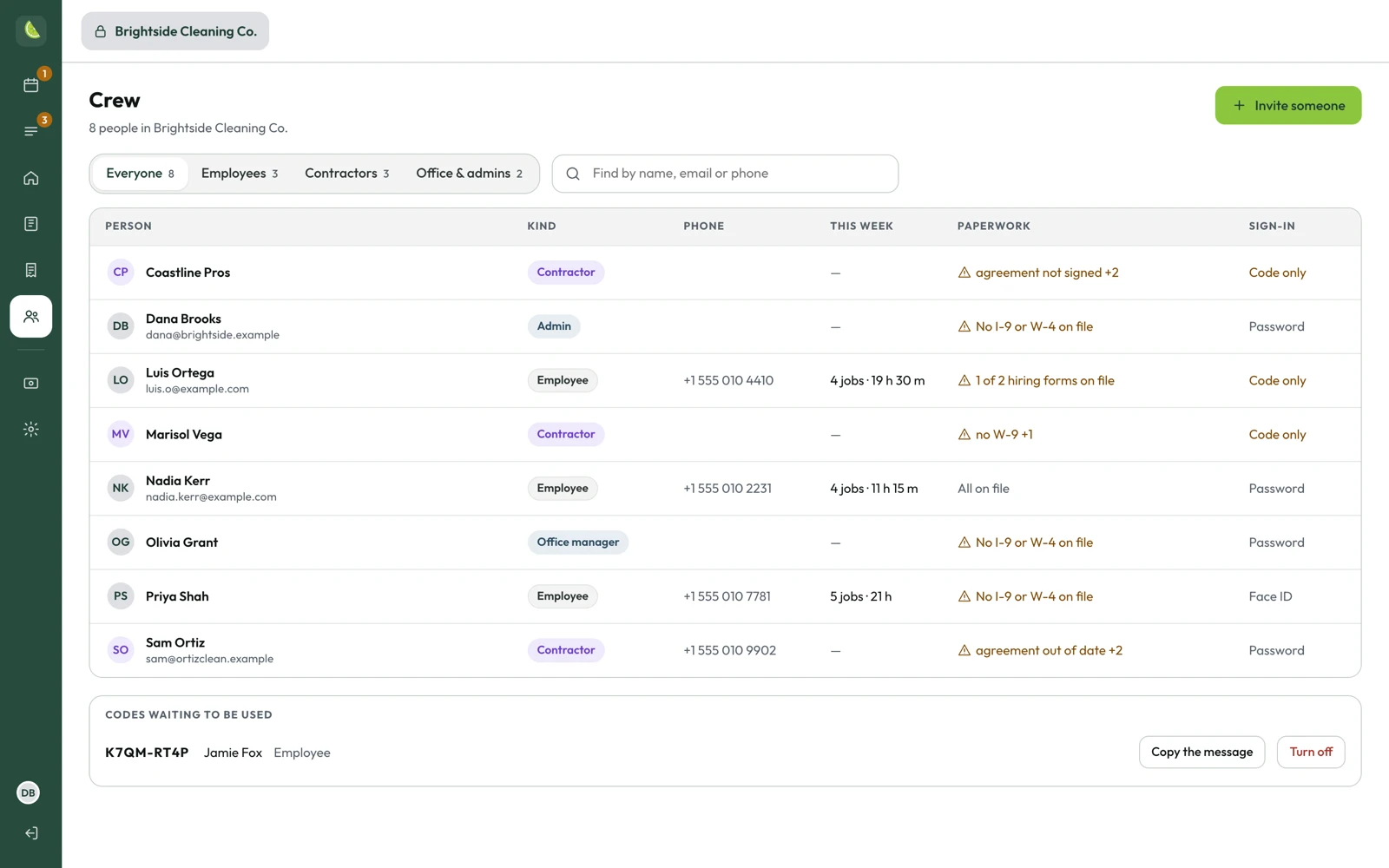
The crew page: employees, contractors and office staff in one table with their jobs this week, which hiring forms or contractor papers are missing, and how each one signs in.
Crew and paperwork. Who's working this week, and whose I-9, W-4 or W-9 is still missing.

Schedule

A week timetable and a crew-by-week view. Repeating jobs weekly, every few weeks or monthly. Change one and LimeFlo asks whether you mean just that day or every one after it.

Properties and clients

Every property grouped under its client, with this week's jobs and what's still missing: rooms, a location, the codes. Each client keeps their own supply rules, house rules and extra tasks.

Crew

Everyone in one table with their week, their paperwork and their access. Invite a new cleaner with a link, switch someone off without losing a single job they did.

Multi-day jobs

The post-construction clean that takes three visits and two weeks

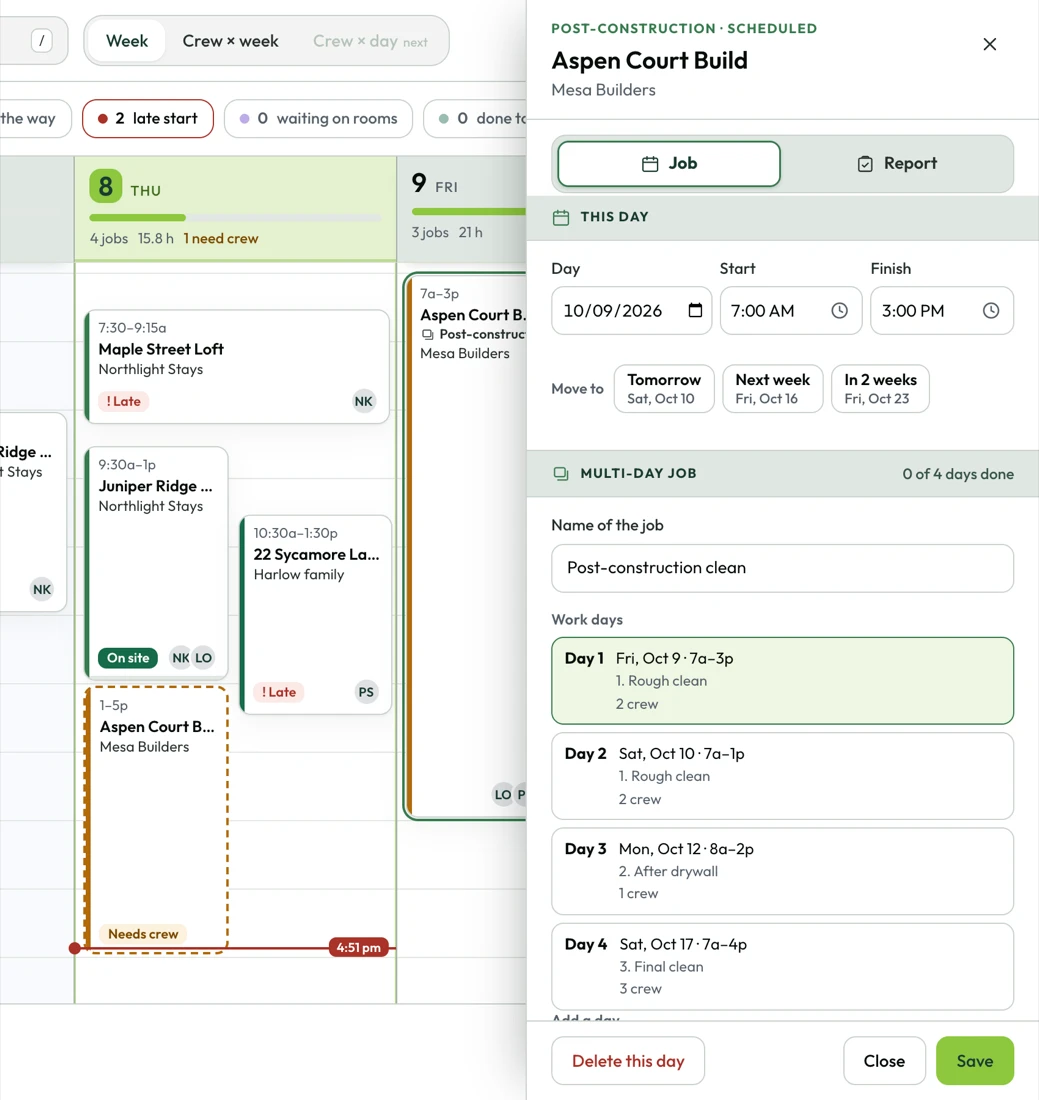
Some jobs don't fit in a day. A builder wants a rough clean, another pass after drywall, and a final clean before the walkthrough. A move-out deep clean runs Tuesday and Wednesday. In most cleaning apps that becomes a handful of unrelated appointments and a spreadsheet to keep track of what's been billed. In LimeFlo it's one job.

  • One job, as many work days as it takes: back to back or spread over a couple of weeks, with days added later when the builder calls for a touch-up
  • Phases with their own price, like rough clean, after drywall and final clean. Or one price for the whole job
  • Every day keeps its own crew, clock and photos, so day three gets the same proof as a single clean
  • Your crew sees "Day 2 of 4 · After drywall" on their phone, never the price
  • Payroll gets each day's share of the price for anyone you pay by the job
ComingMulti-day jobs are in final testing and go live with the next release
A post-construction clean open beside the week schedule: one job with four work days, two for the rough clean, one after drywall and a final clean the following week, each with its own crew.
Every kind of client

A rental turnover and an office contract are different jobs

Property managers, homeowners, office managers, general contractors. Each one has their own properties, their own supplies and their own rules, and every property gets the rooms that fit the work. A cabin gets bedrooms, a bunk room and a hot tub. A dental office gets reception, operatories and restrooms.

  • Vacation rentals, homes, commercial and post-construction out of the box, plus your own categories like windows or move-outs
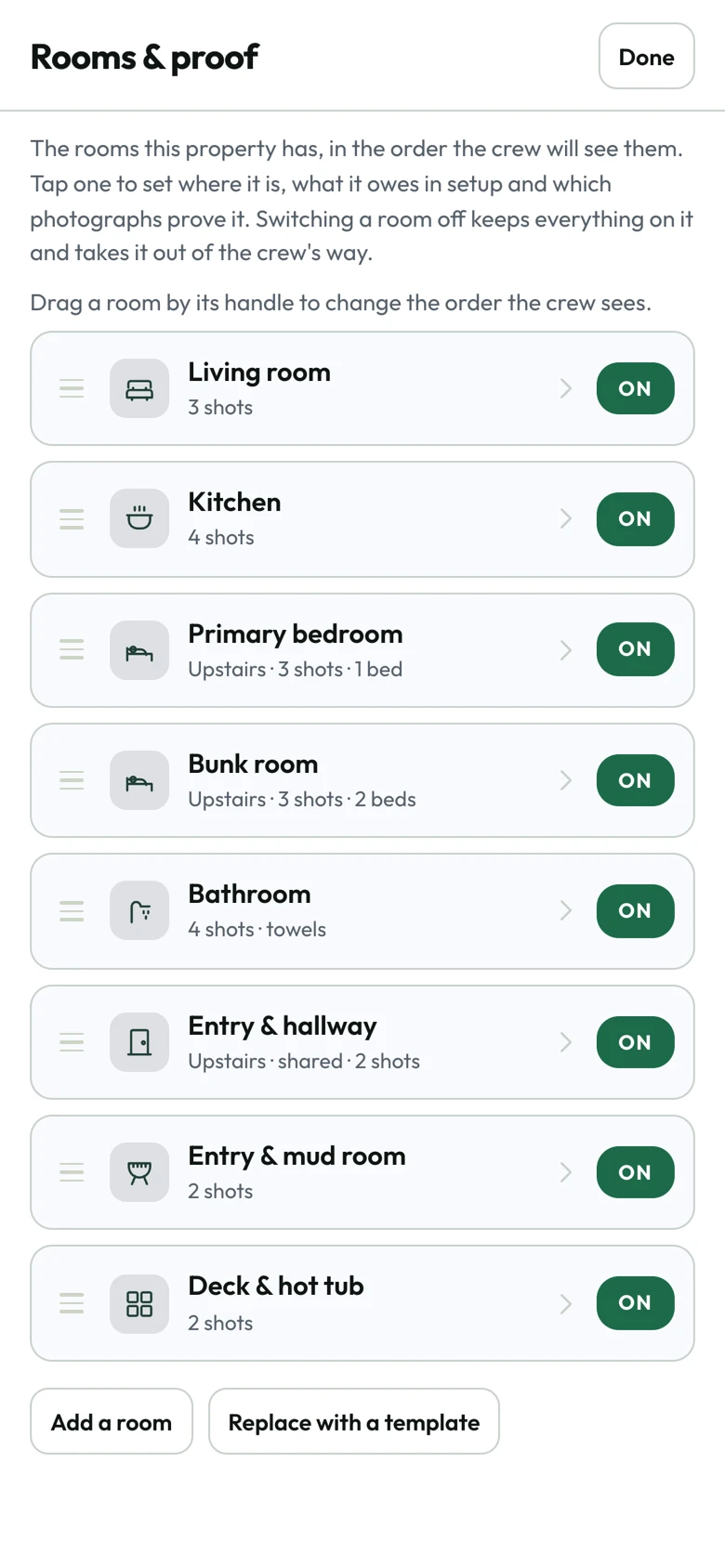
  • Rooms from a template, then renamed, reordered or switched off for each property
  • Client rules go out with every job: who brings supplies, products never to use in that house, what has to be photographed
  • Reference photos of how each room should look, so a new cleaner gets it right the first time
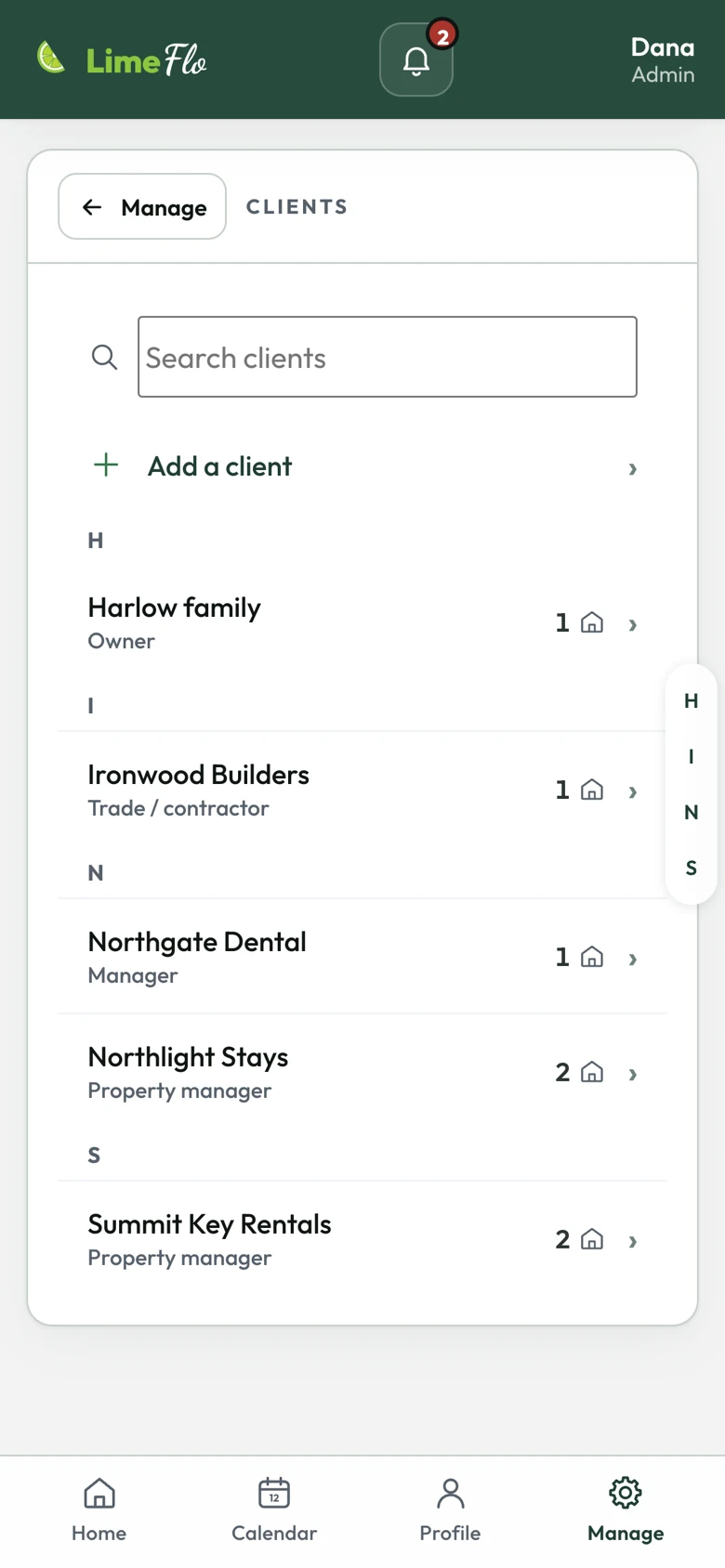
The client list: a family who owns a home, a building contractor, a dental office and two property managers.
Rooms and proof for one property: each room with the number of proof photos it needs and an on switch.
The crew app

Built for the person standing in the kitchen

Your cleaners open their phone and see today's jobs. Tap one and it's all there: a photo of the place so they know they're at the right door, the lockbox code, when the guests leave and when the next ones arrive, and a Navigate button. If the office left a note that matters, they can't start until they've read it.

  • English, Spanish and Portuguese. Each cleaner picks their own; the office still reads everything in English
  • Works in a basement with no bars. Rooms, photos and reports wait on the phone and send when the signal's back
  • A laundry timer that pings them when the dryer's done, and linen counts for the properties that need them
  • A reminder if they forget to clock out, at the job's end time and again an hour later
  • An SOS button. Hold it for two seconds to text their emergency contact with their location, or call 911
  • Their own login. The office sends an invite link, they set a password, then sign in with Face ID. Every photo and every minute has a name on it
TodayIn any phone browser, at limeflo.app
ComingiPhone app on the App Store
LaterAndroid app on Google Play
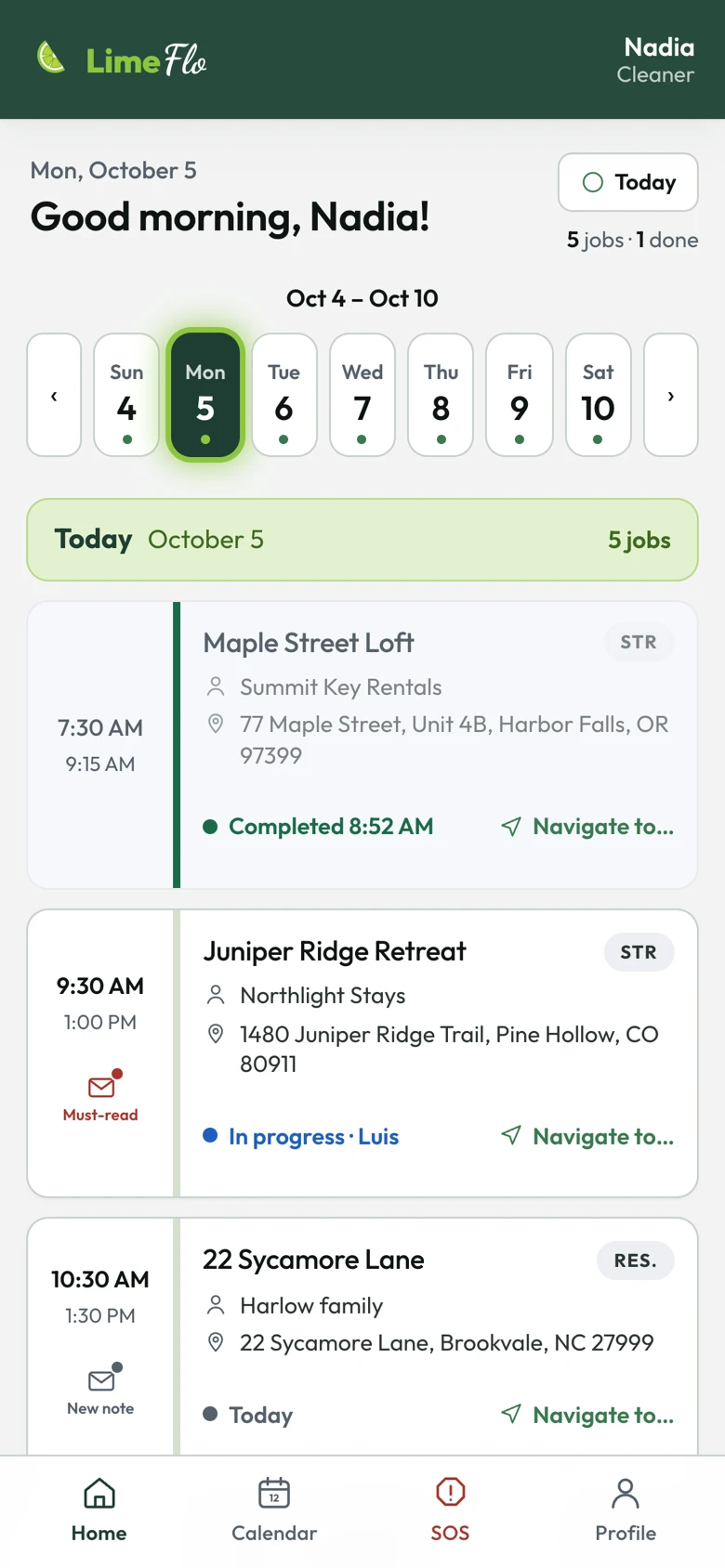
A cleaner's home screen: good morning, the week strip and today's jobs with their addresses.
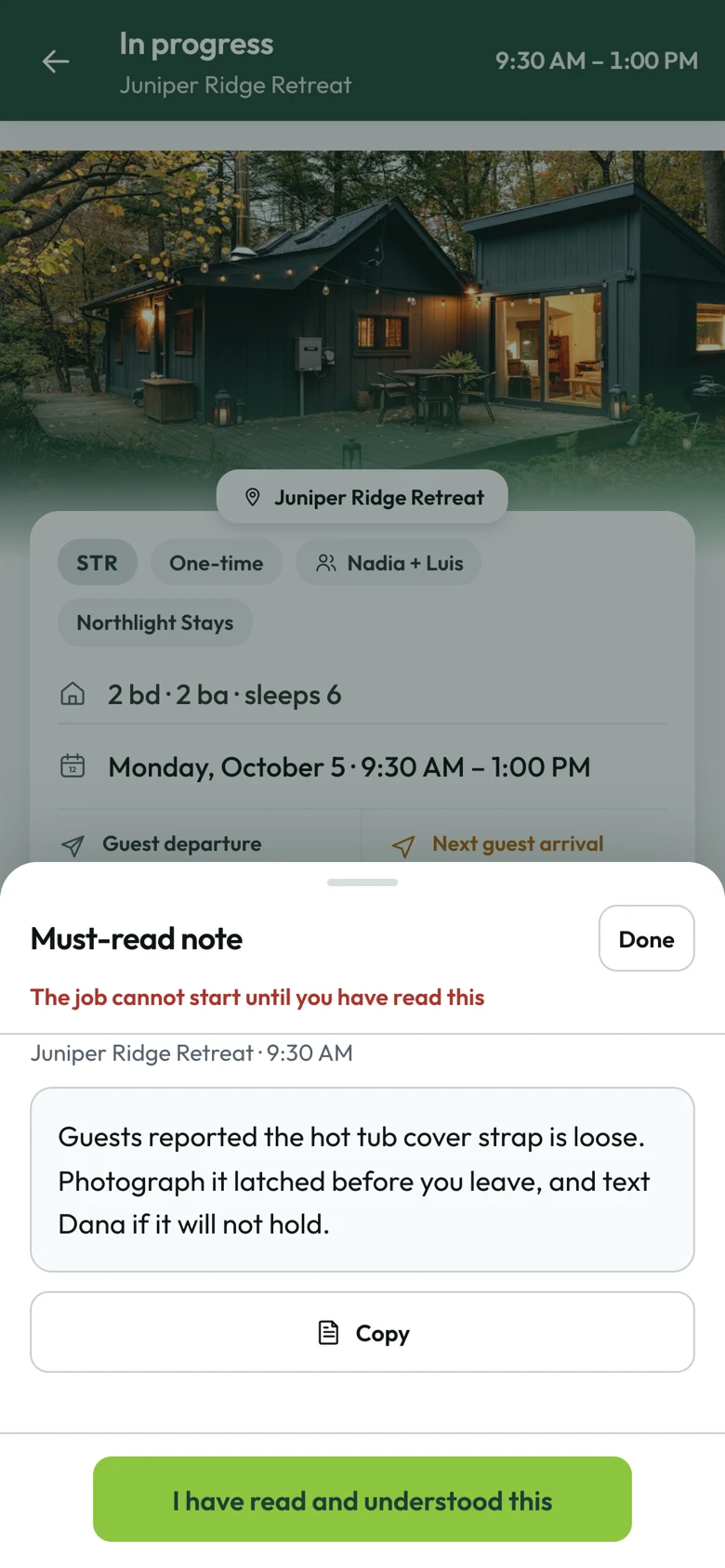
A must-read note from the office over the job card: the hot tub cover strap is loose, photograph it latched before leaving. The job cannot start until the cleaner taps I have read and understood this.
Proof

A room is done when there's a photo of it

A checkbox takes one tap and proves nothing. In LimeFlo each room asks for the shots that show it's finished: the bed made, the toilet, the shower with no hair in it, the floor. Take them and the room is done.

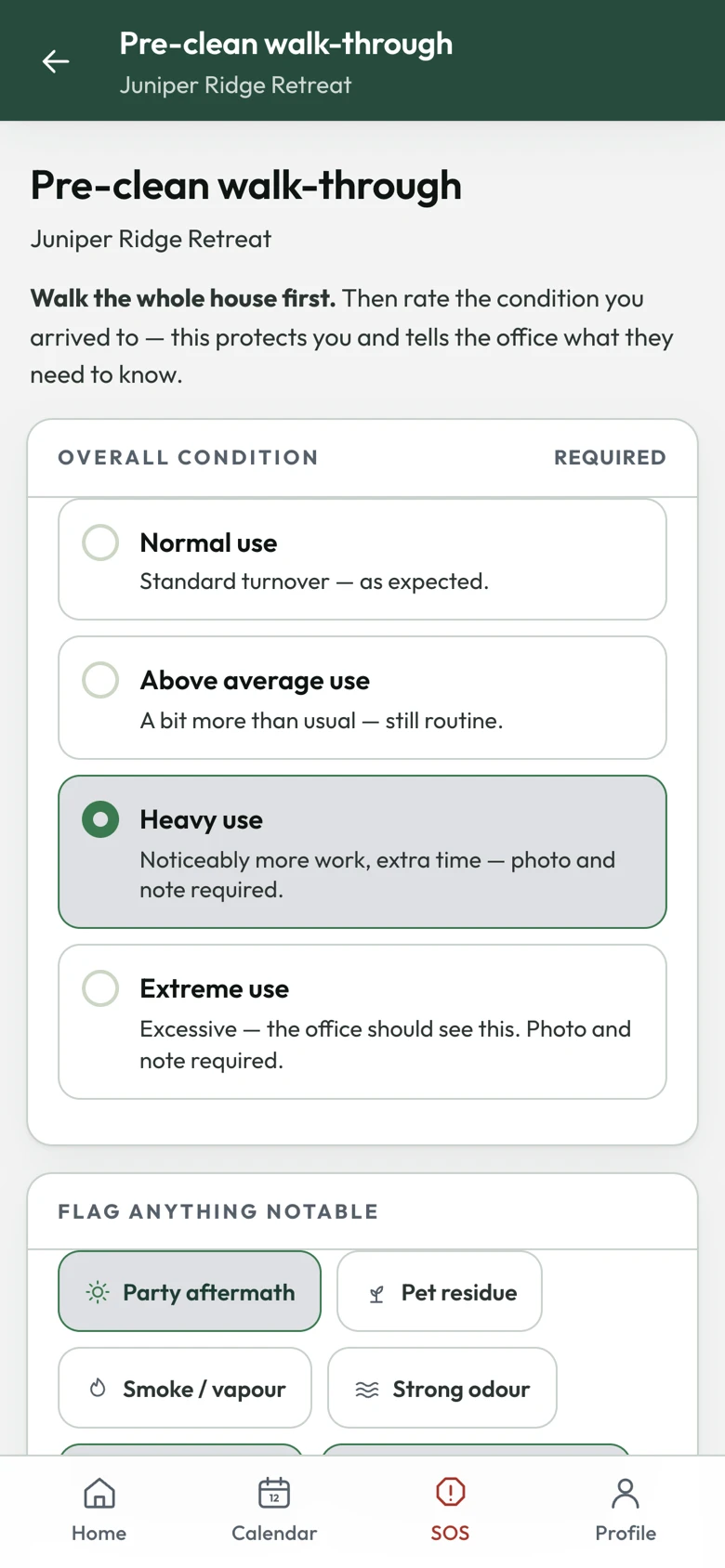
The pre-clean walk-through: rate the condition the place was left in and flag anything notable.
Before: the walk-through
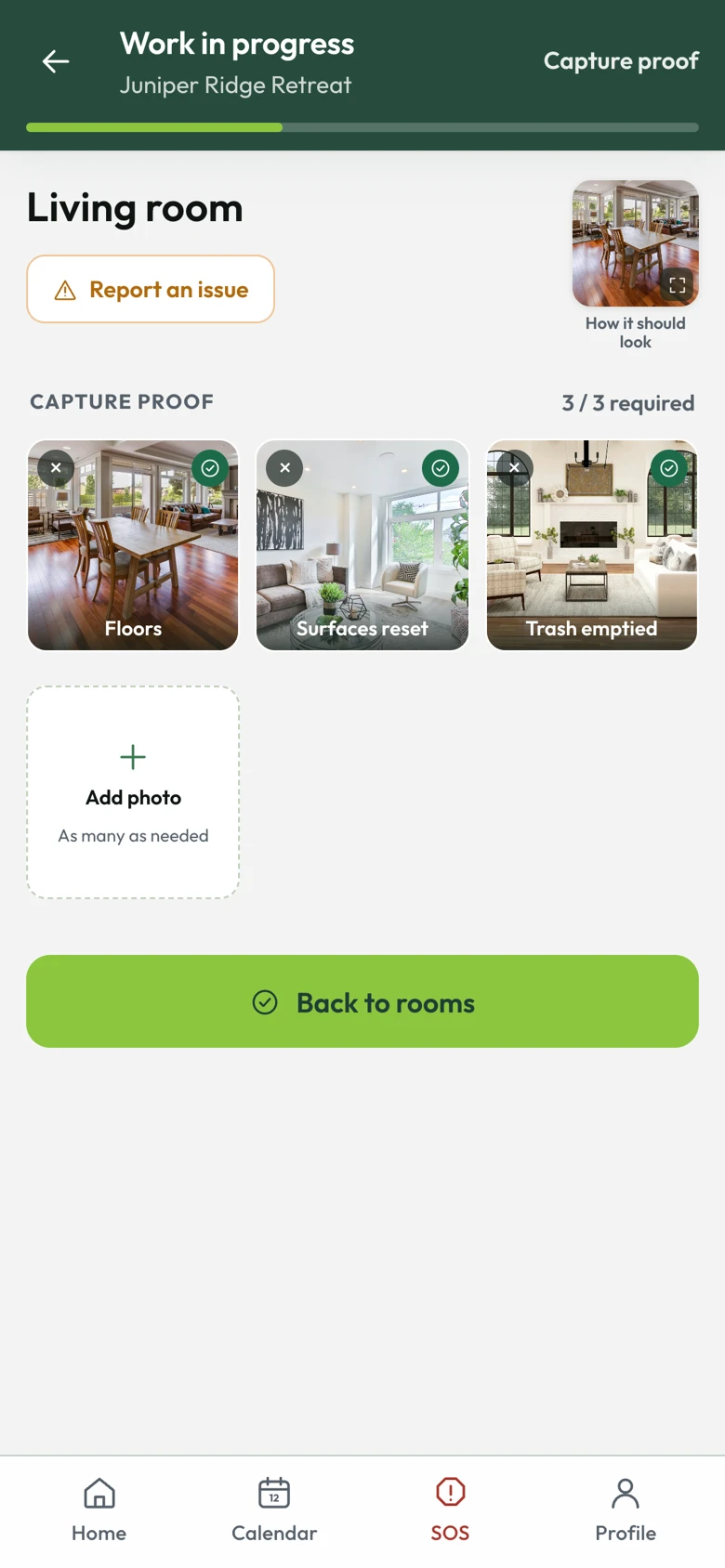
The living room with its three proof photos taken: the floor, the surfaces reset and the trash emptied, next to a reference photo of how the room should look.
During: proof, room by room
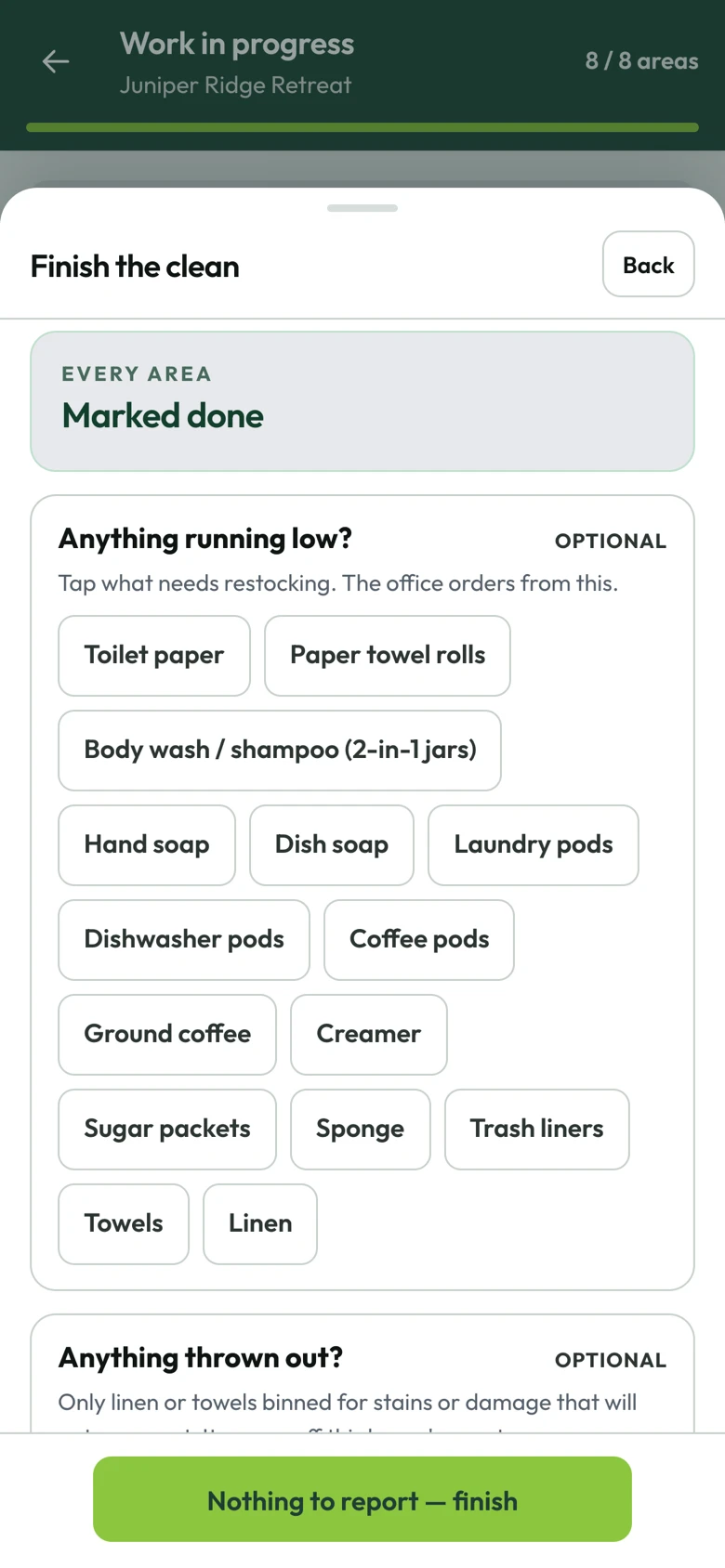
Finishing the clean: pick anything running low or thrown out, or finish with nothing to report.
After: what's running low

The walk-through comes first

Before anything gets touched, the cleaner rates how the guests left it and flags a party, pets, smoke or damage. Heavy use needs a photo and a note. Once it's filed it can't be changed, so the last guest's mess never lands on your crew.

Shots with names on them

"Bed made." "Shower, no hair." Each shot is named, sits next to your reference photo of the finished room, and is stamped with the time. A picture from the phone's library is allowed, and the report says so.

Fixed, never quietly changed

A cleaner can undo an accidental finish for two hours. After that only the office can reopen a clean, and it has to give a reason. Every change is added to the record. Nothing is erased.

For your clients

Send proof, not a text that says "done"

When the last cleaner clocks out, LimeFlo puts together a report for your client from what the crew actually recorded: every room with its photos, when the clean finished, and whether the phone was at the property when it did. Property managers stop asking "did you get to the bunk room?" because they can see it.

  • Built on the server from the crew's records. Nobody can touch it up before it goes out
  • Every room, every photo, how the place looked on arrival, and anything that's running low
  • Location confirmed, never shown. The client sees that the times were taken at the property, not your cleaner's coordinates
  • Your name on it. No cleaner's hours, phone number or last name, unless you choose to show them
  • A private link that expires, with the people who get it set per client
TodayThe report and its private link, made automatically and shared from the job
ComingEmailed straight to each client's contacts the moment the job is finished
The top of a completion report: the cleaning company's name, the property, the date, a badge saying all six rooms were proven with photos, and the finish time confirmed at the property by GPS.
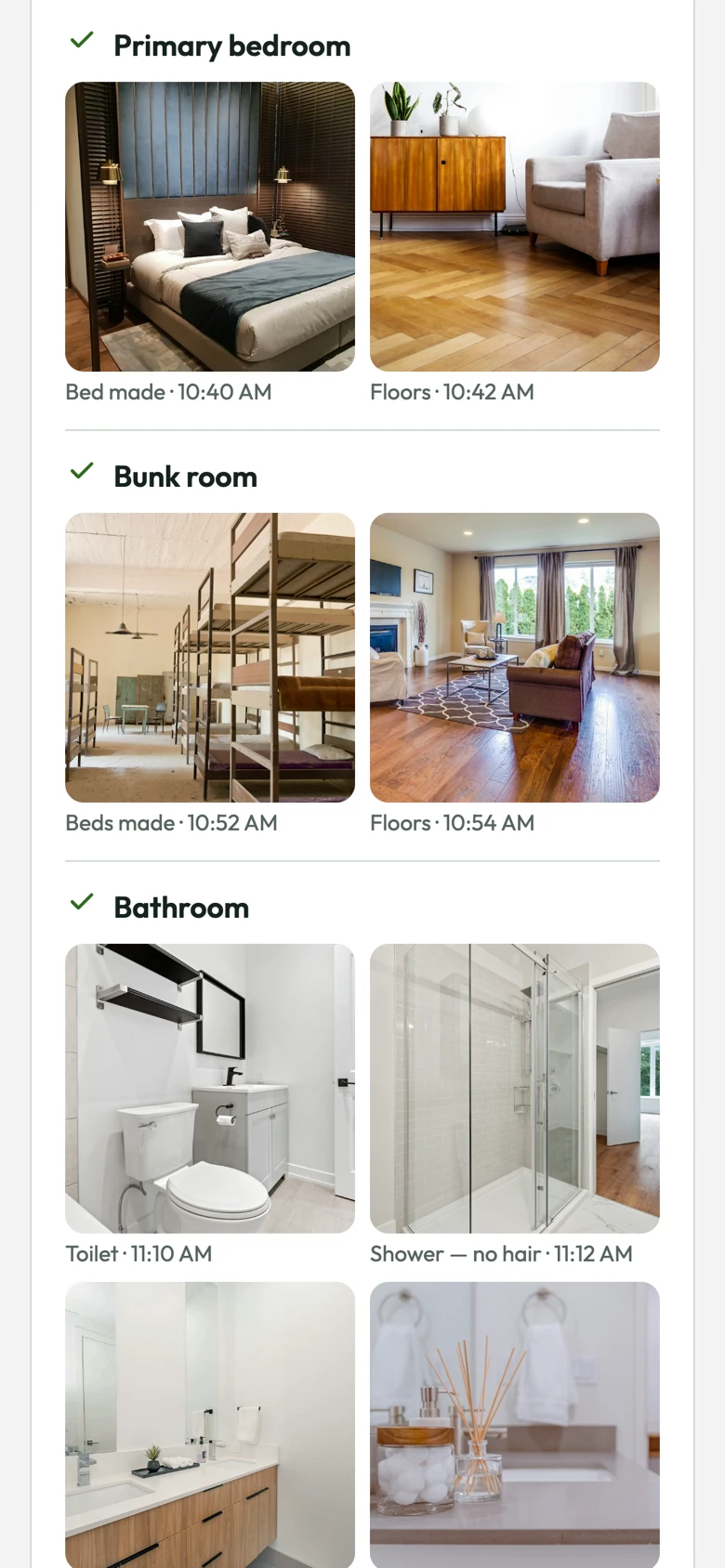
Further down the report: the primary bedroom with the bed made and the floor, the bunk room, and the bathroom with the toilet, the shower, the sink and the towels, each photo with its time.
Hours and payroll

Hours you can stand behind, and payroll that adds itself up

Starting a job clocks the cleaner in. Clocking out ends it. The time comes from our server, not the phone, and the location is checked at both ends. When someone forgets, the office fixes it and the record shows who changed what and why. At the end of the week, LimeFlo works out what everyone's owed.

  • Every time is marked: at the property by GPS, somewhere else, no location, or set by the office
  • A clock left running is caught. Paid time stops at the last real work plus your grace period, and the claimed time is kept beside it
  • Pay the way you already do: by the hour, by the job, a share of the job price, or hourly plus a job rate
  • Approve the week and it's frozen. Late corrections carry into the next one. Export a CSV for your payroll provider
  • The office hears about it when someone clocks in, clocks out, starts late or is still on the clock hours after the job
TodayPush alerts to the office and the crew
ComingThe same alerts by text message
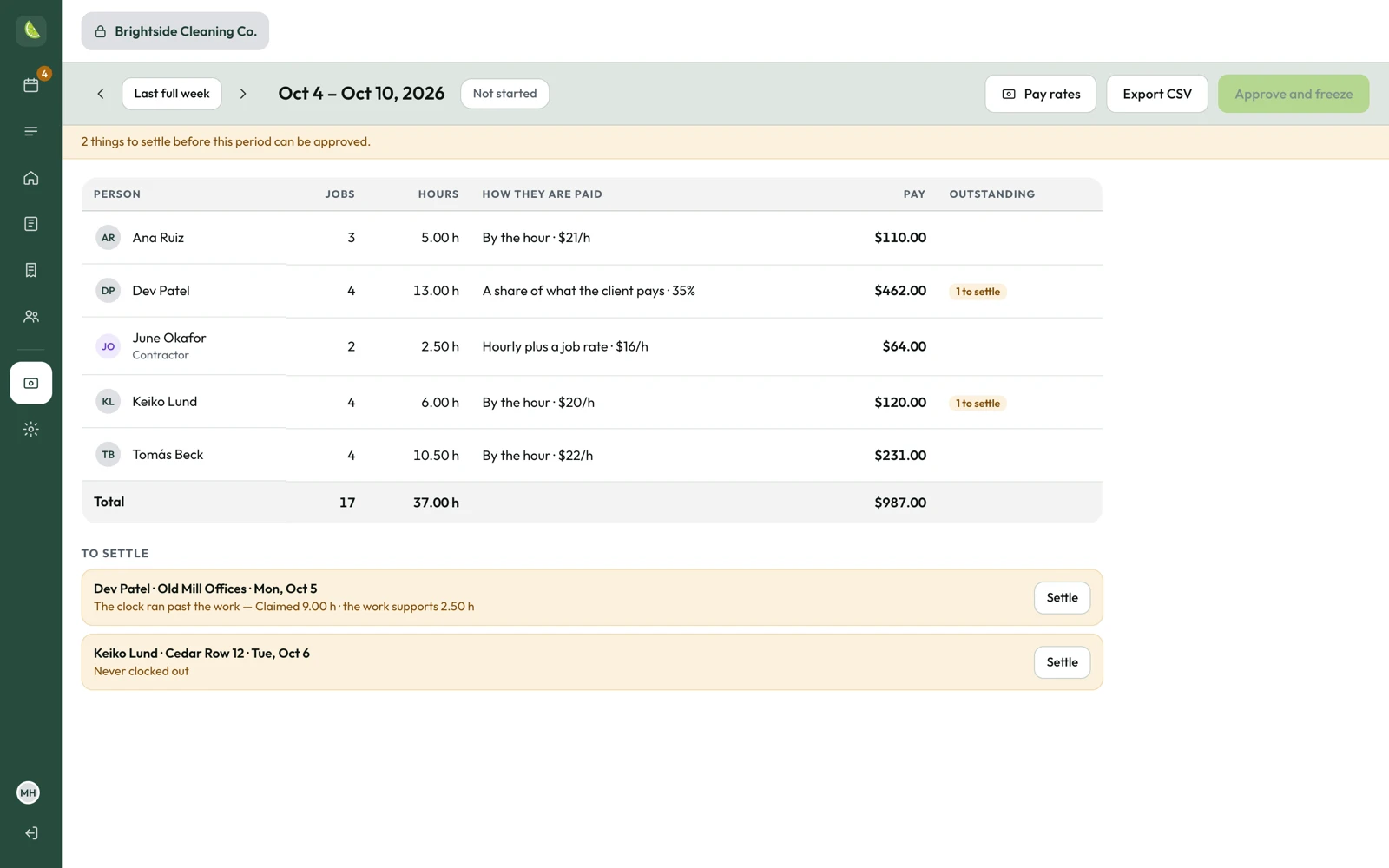
The payroll page for one week: each person's jobs, hours, how they are paid and what they are owed, a total, and one clock-out flagged to settle before the week can be approved.
Contractors

Extra hands for the busy weekends

Saturday turnovers don't care how many people you have on payroll. Send overflow work to independent contractors, and they'll clock in and photograph every room the same way your crew does.

Your price, or theirs

Invite a contractor to a job at a set price, or leave it open and let them name theirs. You'll get a notification when they answer, then you pick.

Paperwork on file

They sign your contractor agreement and send their insurance certificate and W-9 right in the app. The office sees what's still missing.

Your client stays your client

A contractor sees the job and the property. They never get the client's phone, email or full name. Their jobs show up on payroll apart from your employees.

$79a month for the whole company
$0per employee, per property, per client
3languages, picked by each cleaner
1schedule for every client you have
Pricing

$79 a month. Five cleaners or fifty.

One price for the whole company. Most cleaning software charges you for every person you hire and every property you take on. That's exactly how a cleaning company grows, so we don't.

LimeFlo · everything included
$79/ month

For your whole company: every employee, property and client.

  • Unlimited employees: cleaners, office staff and admins. Hire for the summer and your bill stays the same.
  • Unlimited clients, properties and jobs. Win another property manager and your bill still stays the same.
  • Everything on this page: bookings, the office, the crew app, photo proof, client reports, the GPS clock and payroll.
  • Anything marked Coming is included when it ships.
  • The browser app today, and the iPhone and Android apps when they launch.
  • Month to month. No contract, no setup fee.
Contractors

$10 a month per contractor, only in months they take a job. Inviting them, their bids and the jobs they turn down cost nothing. Their work is reported apart from employee hours.

Request access

We're setting companies up one at a time. Your first 30 days are free.

Per-cleaner pricing punishes hiring

Crews change with the season. Pay per seat and you pay for every new hire, plus the ones who left last month and still have a login.

Per-property pricing punishes growth

LimeFlo is built for companies that clean for lots of property managers. Charging per property would make our best customers our most expensive ones.

The portal routine costs more

If checking portals and chasing clock-outs eats 20 minutes of your office's day, that's about seven hours a month. That's more than $79 at almost any office wage.

Monthly costLimeFloZenMaid
Pro Max
Jobber
Connect / Grow
Housecall Pro
Essentials / Max
Owner + 3 cleaners$79≈ $121$139$189
Owner + 10 cleaners$79≈ $289$228$434
Owner + 25 cleaners$79≈ $649$663$959
Each contractor$10
months with a job
≈ $24$29$35–100
Invoicing, quotes and card paymentsNot includedIncludedIncludedIncluded

Month-to-month list prices from each company's pricing page, September 2026, on the cheapest plan with GPS tracking, job photos and checklists, before text-message and payment fees. Jobber and Housecall Pro are 20–40% cheaper if you pay yearly. For a one-person business their entry plans cost about the same as LimeFlo; the gap opens up as your crew grows. LimeFlo doesn't do invoicing or take payments, so most companies keep their accounting software for that. Check their pricing pages before you rely on ours. See the full comparison.

Where we stand

Your records belong to you

A trial that ends goes read-only

If your free month runs out before you subscribe, LimeFlo stops taking new work, and every photo, visit and report stays right there to read. That's your evidence if a damage claim ever comes in. Nobody holds it hostage.

Support gets in only when you let us

Your admin can open the door to LimeFlo support for 14 or 28 days, to look only or to help fix something. It closes on its own, and every visit is logged where you can read it. Tax forms and personal profiles stay off limits.

Location is a stamp, not a trail

A position when the cleaner clocks in, another when they clock out, and nothing in between. No background tracking and no live map of your people.

One company can't see another's

Every read and every write is checked on the server against who's signed in. No ads and no third-party trackers in the app. A cleaner can delete their own account; the work they did stays with your company.

Questions

What people ask us

Which booking systems does LimeFlo read?

Right now, Hospitable. Paste a reservation or cancellation email into the office's Reservations page or into the app, and LimeFlo turns it into a clean that waits for your decision. Next up: your own LimeFlo address you can forward those emails to, so they come in by themselves, and emails from Turno, Breezeway, Guesty and others.

If your property managers use something we don't read yet, send us a sample email with the guest details taken out. Teaching LimeFlo a new system is the work we're doing next.

Will anything get scheduled without me?

No. Every booking waits until someone in your office schedules it, saves it for later or turns it down. Cancellations come back to the same place, along with the clean they affect, and a person decides what happens to it.

Can LimeFlo replace ZenMaid or whatever I use now?

That's what it's built for. The schedule, repeating jobs, assigning crew, the GPS clock, photo proof, client reports and weekly payroll are all inside LimeFlo. Payroll gives you hours and pay per person and a CSV export; your payroll provider still sends the money. The one thing we don't do is invoicing, so keep your accounting software for that.

Do I need a computer, or does it all work on a phone?

Both work. Cleaners only ever need their phone. The office can run everything from the phone app too, but on a laptop you get the full back office: the week timetable, the crew view, reservations, properties, clients, crew and payroll side by side.

What does my client actually see?

A clean, private web page with your company's name at the top: each room and its photos, when the clean finished, confirmation that the times were taken at the property, how the place looked on arrival, and anything running low. They don't see your cleaner's hours, phone number or exact location. You choose who gets it for each client, and the link expires on its own.

Can I send jobs to contractors?

Yes. Invite a contractor to any job at a set price, or leave the price open and let them name theirs. They sign your agreement and send their insurance certificate and W-9 in the app, clock in, photograph every room and file the same report as your crew. They see the job, never your client's contact details. Their jobs show up on payroll apart from employee hours. It's $10 a month per contractor, only in months they take a job.

Contractors are for independent businesses. If someone works for you as an employee, they belong on your crew. Paying an employee as a contractor, or the other way round, is misclassification and can break federal and state labor and tax law.

How do cleaners sign in?

The office invites each person with a link or an eight-character code that works once. They set their own password when they join and can turn on Face ID, so signing back in takes a glance. If someone leaves, switch them off. Their past jobs keep their name.

Are you tracking my cleaners?

No. LimeFlo takes a position when a cleaner starts a job and another when they clock out. Nothing in between. The office sees how far from the property each one was; there's no geofence and no live map. A job can't be started with location switched off.

What if someone forgets to clock out?

They get a reminder on their phone at the job's end time and again an hour later. If they're still on the clock after the time you set, the office gets told. Nothing is closed automatically. Paid time stops at their last real work plus your grace period, and the time the phone claimed is kept right beside it, so nothing is quietly cut. The office can set the right time, and the record shows who did it and why.

Does it work without signal?

Once a cleaner is signed in, yes. Rooms, photos and the finish report are saved on the phone and sent when the connection comes back. Signing in for the first time needs a connection, and starting a job needs a location fix.

Is there an iPhone or Android app?

LimeFlo works in any phone browser today at limeflo.app. The iPhone app is on its way to the App Store, and Android comes after that. Same app, same account, wherever you open it.
How do I get started?

Email dev@limeflo.cleaning. We're setting companies up one at a time, so we'll get yours going with you: your clients, your properties and your first few cleaners. The first 30 days are free. After that it's $79 a month for the whole company.

Who can see my company's data?

The people you invite, in the roles you give them. LimeFlo support only gets in when your admin turns it on, for 14 or 28 days, and every visit is logged where you can see it. There's no advertising and nothing is sold.

Verified. Clean.

Get your mornings back

Tell us who you clean for. We'll set up your clients and properties with you and get your first cleaner on the schedule.

Or write to dev@limeflo.cleaning

$79 a month for the whole company · First 30 days free · iPhone app coming